

AI Digest
Accepted globally, electronic signatures carry significant legal weight under frameworks like the US ESIGN Act and Europe’s eIDAS Regulation. With contemporary platforms, you can sign PDFs online using any browser or mobile tool, eliminating the need for complex installations. SignNow optimizes these document workflows by uniting file setup, reusable templates, and detailed audit trails into a seamless, cloud-connected experience.
- Learn how to sign a PDF electronically from any device.
- Understand the difference between electronic signatures and digital signatures.
- See how SignNow streamlines document preparation, signing, and tracking.
- Compare SignNow with free and paid alternatives.
- Discover which security standards and regulations apply to electronic signatures in 2026.
- Find answers to common questions in the glossary and FAQ at the end of this guide.
What is an electronic signature?
An electronic signature (or eSignature) is a legally recognized way to show a person’s intent to agree to or approve an electronic document. Depending on the signing workflow, an electronic signature may consist of a typed name, a drawn signature, clicking an Accept button, or another electronic action associated with the signer.
Unlike traditional handwritten signatures, electronic signatures allow individuals and businesses to sign PDF online from virtually anywhere while maintaining a verifiable record of the signing process.
It’s important to distinguish electronic signatures from digital signatures. While the terms are often used interchangeably, a digital signature is a specific type of electronic signature that uses cryptographic technology and digital certificates to verify signer identity and detect document tampering.
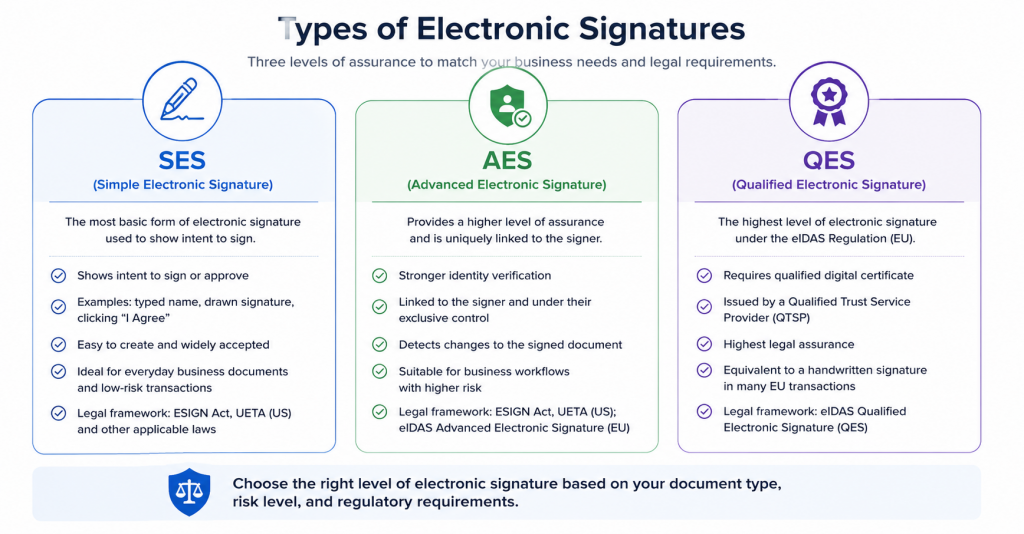
In the United States, electronic signatures are generally recognized under the Electronic Signatures in Global and National Commerce (ESIGN) Act and the Uniform Electronic Transactions Act (UETA). In the European Union, electronic signatures are governed by the eIDAS Regulation, which defines Simple Electronic Signatures (SES), Advanced Electronic Signatures (AES), and Qualified Electronic Signatures (QES).
The purpose and benefits of electronic signatures
Electronic signatures are used to sign documents online, eliminating the need for printing, scanning, mailing, and storing paper copies. They support a wide variety of business processes, including contracts, onboarding documents, purchase agreements, tax forms, healthcare paperwork, financial documents, and internal approvals.
As organizations continue adopting digital-first workflows, eSignature platforms have evolved beyond simple signing tools into complete document workflow solutions that help automate approvals, improve collaboration, and reduce administrative work.
1. Faster document turnaround
Instead of waiting days for documents to be printed, mailed, or scanned back, recipients can review and sign PDF online within minutes from a desktop or mobile device. Automated reminders and signing workflows help reduce delays.
2. Improved security
Electronic signature platforms help protect documents through encryption, audit trails, signer authentication, permission controls, and tamper-evident document history, providing greater visibility than traditional paper-based processes.
3. Lower operating costs
Organizations can significantly reduce expenses associated with printing, postage, physical storage, and manual document handling while minimizing administrative overhead.
4. Better customer and employee experience
Modern eSignature solutions enable customers and employees to complete documents from virtually anywhere without downloading specialized software, creating a faster and more convenient experience.
5. Global collaboration
Teams, customers, vendors, and partners can review and sign documents across countries and time zones, helping organizations accelerate international business operations.
6. Compliance and audit readiness
Leading eSignature platforms generate detailed audit trails that record key signing events, timestamps, recipient actions, and document history. These records help organizations demonstrate compliance and support internal governance requirements.
Types of electronic signatures
Electronic signatures come in various forms, each offering a different balance of convenience, identity verification, and legal assurance.
Simple Electronic Signature (SES)
A Simple Electronic Signature (SES) is the most commonly used type of eSignature. It can include a typed name, a drawn signature, clicking an “I Agree” button, or another electronic action that demonstrates a person’s intent to sign. SES is suitable for many everyday business documents, including sales agreements, NDAs, HR forms, and internal approvals.
Advanced Electronic Signature (AES)
An Advanced Electronic Signature (AES) provides stronger identity verification and is uniquely linked to the signer. Depending on the platform and jurisdiction, it may incorporate multi-factor authentication, biometric verification, or digital certificates. AES is commonly used when organizations require greater confidence in signer identity.
Qualified Electronic Signature (QES)
A Qualified Electronic Signature (QES) is the highest level of electronic signature recognized under the EU’s eIDAS Regulation. It requires identity verification by a Qualified Trust Service Provider (QTSP) and uses a qualified digital certificate. Within the European Union, a QES carries legal effect equivalent to a handwritten signature in many regulated scenarios.
Choosing the appropriate signature type depends on your organization’s legal requirements, industry regulations, and the level of identity assurance needed for each transaction.
How to create an electronic signature
Whether you’re signing a contract yourself or preparing documents for customers, creating an electronic signature takes only a few minutes with SignNow. The platform works in any modern browser and is also available on mobile devices, allowing you to e-sign PDF documents from virtually anywhere.
SignNow supports commonly used document formats, including PDF, Microsoft Word (DOC/DOCX), PowerPoint (PPT/PPTX), Excel (XLS/XLSX), and popular image formats such as JPG and PNG, making it easy to prepare documents without converting files first.
Follow these steps to create your electronic signature in SignNow.
1. Upload your document
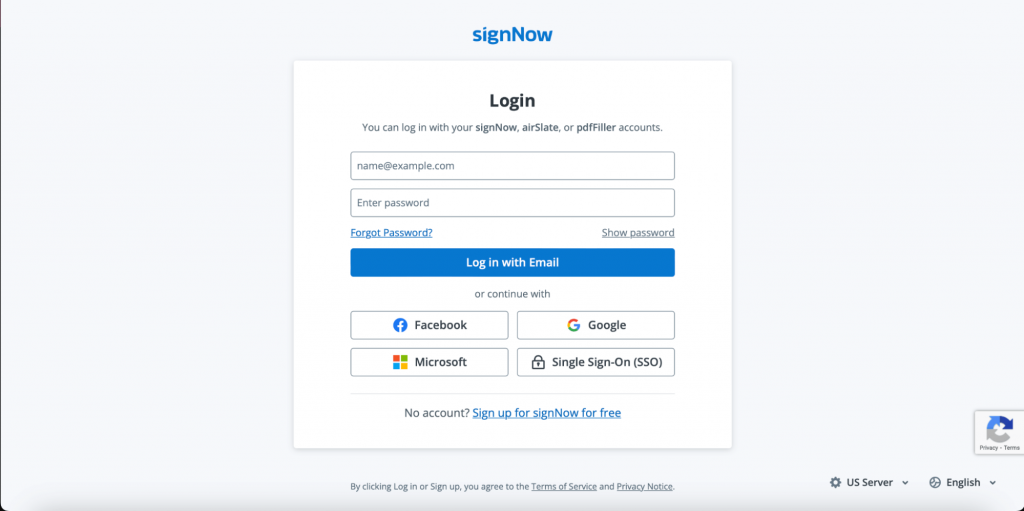
Log in to your existing SignNow account or start a free trial. Upload a document from your computer or import one from supported cloud storage services. You can also start from a reusable template if you frequently send the same document.
From your dashboard, you can:
- open an existing document;
- upload a new file;
- use a saved template for recurring workflows.
2. Prepare your document
Select Prepare & Send to open the document editor.
From here, you can:
- add fillable fields;
- insert signature, initials, date, text, checkbox, and dropdown fields;
- edit document content where supported;
- assign fields to individual recipients;
- set required fields before sending.
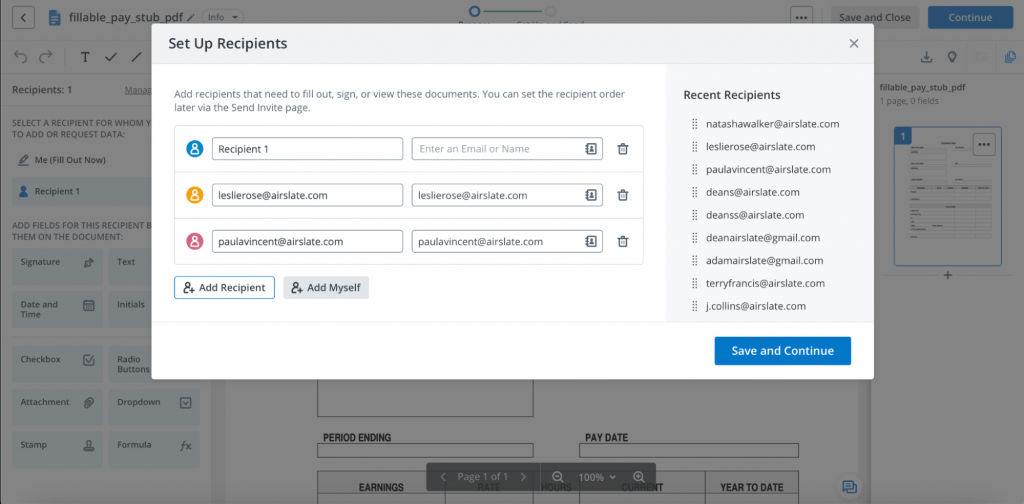
If multiple people need to sign, add each recipient and assign only the fields relevant to them. This helps reduce errors and keeps the signing experience simple.
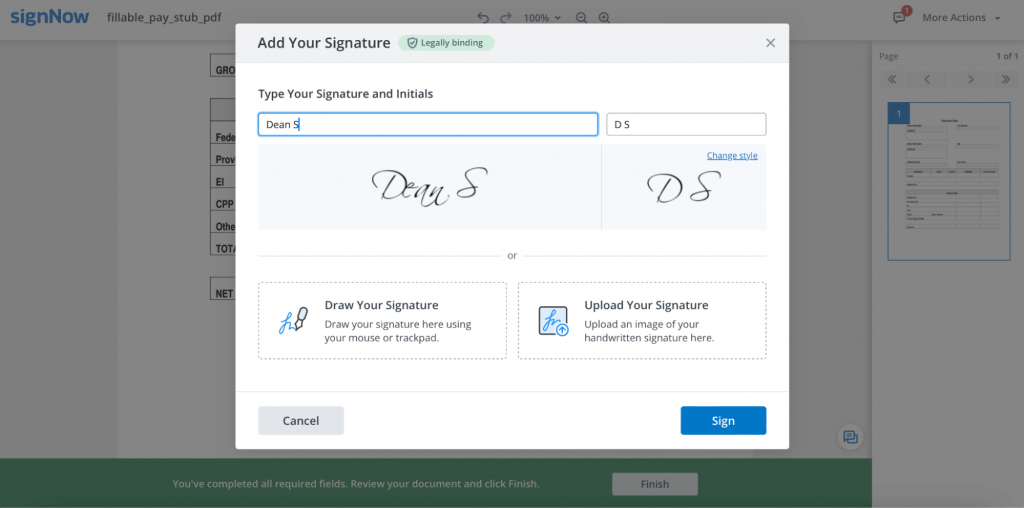
3. Create your signature
SignNow lets you create a signature in several ways.
Type your name
Type your full name and choose from available handwritten-style fonts.
Draw your signature
Draw your signature using a mouse, trackpad, touchscreen, or stylus.
Upload an image
Upload an image of your handwritten signature in PNG, JPG, or JPEG format and position it where needed.
Once created, your signature is securely saved to your account so it can be reused in future documents without recreating it each time.
4. Configure recipients and authentication
After assigning signature fields, configure recipient settings before sending the document.
Depending on your workflow, you can:
- require recipients to sign in a specific order;
- add expiration dates;
- schedule automatic reminders;
- apply recipient authentication methods, such as password or SMS authentication, where available;
- prevent recipients from forwarding documents.
These options help organizations maintain secure and organized approval workflows, especially when multiple stakeholders are involved.
5. Send and track your document
Once everything is ready:
- click Send Invitation;
- recipients receive an email invitation;
- they review the document;
- consent to electronic business where required;
- complete the signature.
After sending, you can monitor document status from the SignNow dashboard. Real-time status updates show whether a document has been viewed, signed, completed, or is still awaiting action.
What makes SignNow safe and secure?
Security is one of the most important considerations when choosing an eSignature platform. Organizations routinely use SignNow to process contracts, HR paperwork, healthcare documents, financial forms, and other sensitive records that require strong data protection.
SignNow includes multiple layers of security designed to help protect documents throughout their lifecycle. Depending on your subscription and workflow, these protections may include encryption, authentication, audit logging, secure cloud infrastructure, and compliance with widely recognized industry standards.
Document encryption
Documents are protected using industry-standard encryption for both stored files and data transmitted between users and the platform, helping reduce the risk of unauthorized access.
Comprehensive audit trails
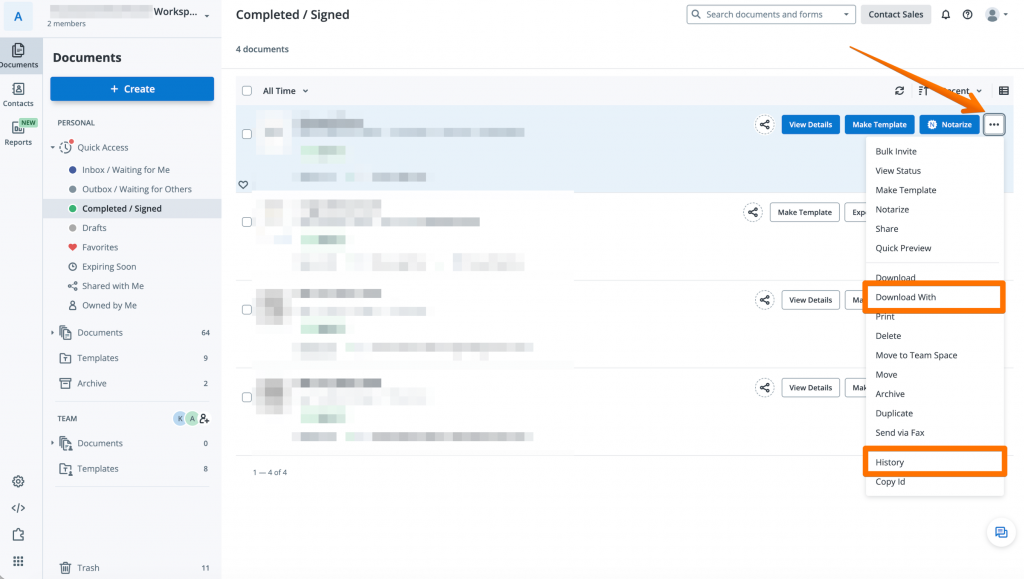
Every completed document includes a detailed audit trail and document history.
The audit log records document activity such as recipient actions, timestamps, IP addresses, email addresses, authentication events, and document completion history. These records help organizations demonstrate document integrity and support compliance requirements.
Authentication options
Organizations can strengthen signer verification by requiring additional authentication methods before recipients access a document. Available options may include password protection and SMS authentication, depending on the workflow and subscription.
Business continuity
Enterprise-grade document platforms maintain disaster recovery and business continuity procedures designed to minimize service interruptions and protect customer data.
Compliance
SignNow supports organizations operating in regulated industries by offering features designed to help customers meet compliance obligations. Depending on the use case and account configuration, the platform supports standards and regulations such as:
- ESIGN Act
- UETA
- HIPAA (available with appropriate agreements and configuration)
- SOC 2 Type II
- PCI DSS
- GDPR
- FDA 21 CFR Part 11 (for applicable workflows)
Because regulatory requirements vary by organization and jurisdiction, businesses should verify that their selected subscription and configuration meet their specific compliance obligations before deploying electronic signature workflows.
How to electronically sign a PDF document with SignNow
Whether you’re signing a contract yourself or requesting signatures from others, SignNow lets you sign PDF online from any modern browser or mobile device. The process takes just a few minutes and requires no software installation.
Step 1. Upload your PDF
Sign in to your SignNow account or start a free trial. Upload a PDF from your computer or import one from a supported cloud storage provider.
SignNow also supports Microsoft Office documents and common image formats, automatically preparing them for electronic signatures where applicable.
Step 2. Prepare the document
Click Prepare & Send to open the editor.
Here you can:
- add signature, initials, date, text, and checkbox fields
- assign fields to each signer
- include optional instructions for recipients
- review the document before sending
If you’re the only signer, simply assign the signature field to yourself. If multiple people need to sign, assign fields to each recipient before continuing.
Step 3. Configure recipients
Add each recipient’s email address and determine how the signing process should work.
Depending on your workflow, you can:
- define a sequential signing order
- send documents to everyone simultaneously
- schedule reminders
- set document expiration dates
- apply recipient authentication for additional security where available
These settings help keep document approvals organized, especially for contracts that require signatures from multiple stakeholders.
Step 4. Send the signature request
Click Send Invitation.
Recipients receive an email with a secure link to review and sign the document.
Before signing, recipients may be asked to consent to conducting business electronically and complete any required authentication steps, depending on the sender’s configuration.
Step 5. Sign the document
Open the document.
Click the highlighted signature field.
Choose your saved signature or create one by typing, drawing, or uploading an image if you haven’t already done so.
Click Sign, then Finish.
Once completed, you can download the signed PDF, share it with other recipients, or access it later from your SignNow account.
Step 6. Track document status
After sending the document, you can monitor its progress directly from the SignNow dashboard.
You’ll be able to see whether the document has:
- been sent
- viewed
- signed
- completed
- or is still awaiting signatures
Real-time tracking helps eliminate manual follow-ups and gives document owners visibility into every stage of the signing process.
If you frequently send contracts, you can also learn how to sign contracts online for multi-party approval workflows.
How to change the signing order in SignNow
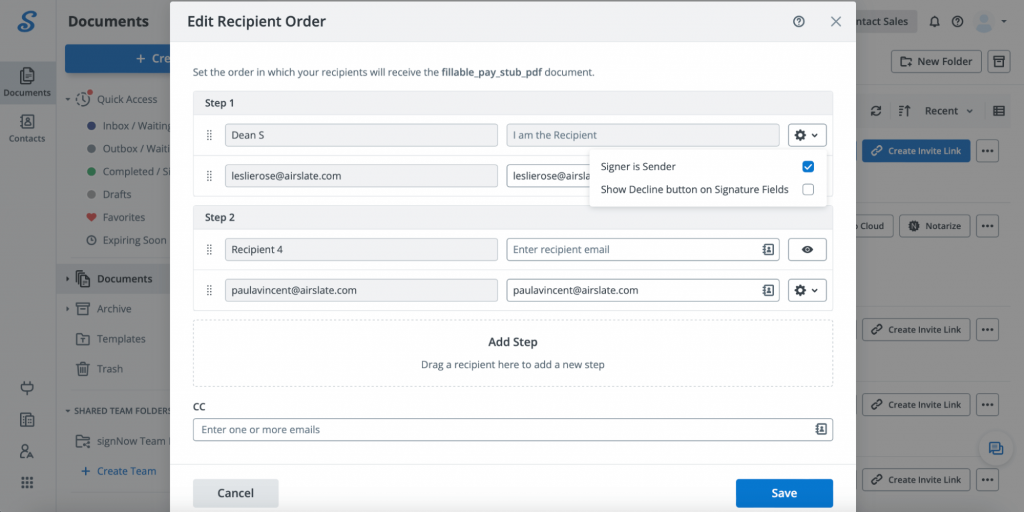
Many business documents require signatures in a specific sequence—for example, an employee, manager, and HR representative may all need to sign before a document is finalized. SignNow lets you define that order before sending the document.
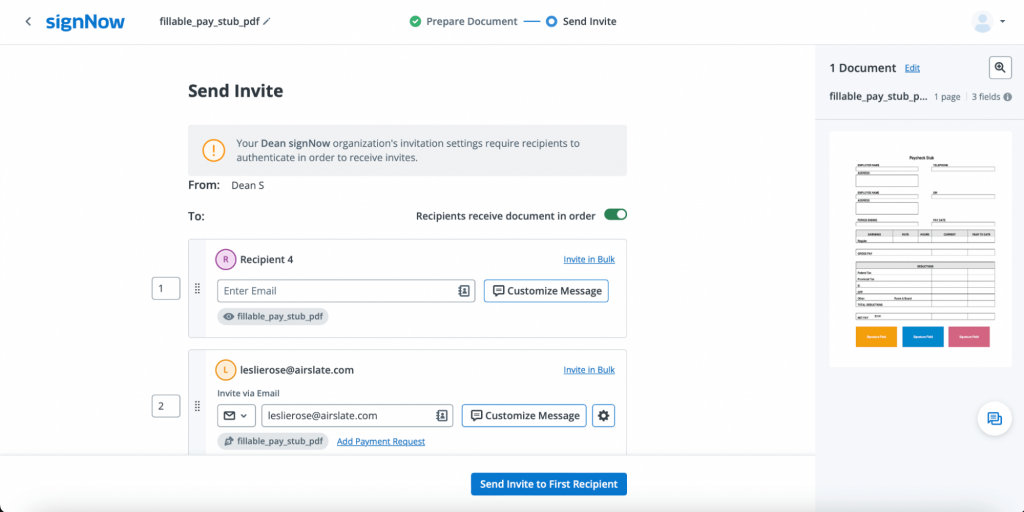
To create a sequential workflow:
- Add all recipients
- Enable the option that delivers the document in signing order (if available for your workflow)
- Assign each signer their position in the sequence
- Save your changes
Recipients will receive the document only after the previous signer has completed their required fields, helping maintain approval workflows and reduce signing errors.
If your workflow doesn’t require a specific sequence, you can send the document to all recipients simultaneously so everyone can sign independently.
How to electronically sign a PDF document in Kiosk Mode using SignNow
For organizations that collect signatures face-to-face, SignNow offers Kiosk Mode on supported iPad devices. Instead of printing multiple paper forms, businesses can generate a fresh copy of a template for every signer while keeping completed documents securely stored in their account.
Typical use cases include:
- patient intake
- event registration
- customer agreements
- retail transactions
- HR onboarding
To start using Kiosk Mode:
- Open the SignNow iPad app
- Select Kiosk Mode
- Choose a document template
- Create a passcode to secure the session
- Configure welcome and completion messages
- Begin collecting signatures
After each signer completes the document, SignNow automatically generates a new copy for the next participant, making high-volume in-person signing faster and more consistent.
Why choose SignNow to e-sign PDF documents?
Electronic signature software should do more than simply capture a signature. It should help organizations prepare documents, automate approvals, monitor progress, and securely store completed agreements.
1. Faster document completion
SignNow allows you to:
- send signature requests by email
- share documents using secure signing links
- monitor recipient activity
- receive notifications after documents are completed
2. Automated workflows
Instead of manually coordinating approvals, you can build repeatable workflows using templates, signing orders, reminders, reusable fields, and recipient management. These features help reduce administrative work while improving consistency across recurring business processes.
3. Collaboration
Organizations can create shared workspaces and collaborate on document workflows while maintaining centralized document management.
Teams can standardize frequently used forms and simplify document distribution across departments.
4. Mobile signing
Recipients can review and sign documents from desktop computers, tablets, or smartphones without sacrificing functionality, making remote work and customer self-service significantly easier.
5. Integrations
SignNow integrates with many popular business applications, helping organizations connect electronic signatures with CRM, productivity, cloud storage, and workflow automation platforms. Businesses with advanced requirements can also use the SignNow API to embed electronic signature capabilities into their own applications.
6. Security and compliance
SignNow includes features designed to support organizations with security and compliance requirements, including audit trails, encryption, authentication options, and support for major regulatory frameworks such as ESIGN, UETA, GDPR, HIPAA (with appropriate configuration), SOC 2 Type II, PCI DSS, and FDA 21 CFR Part 11, where applicable.
Free and paid tools to e-sign PDF documents
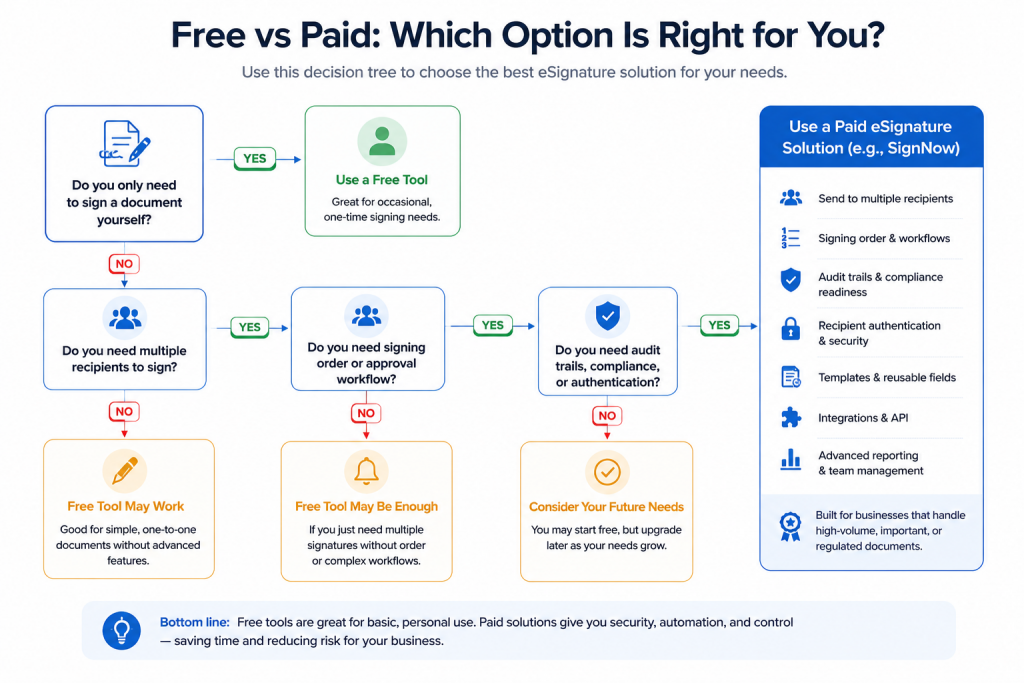
If you only need to sign a single document occasionally, a free PDF signing tool may be enough. However, businesses that regularly send contracts, onboarding documents, tax forms, or approval workflows typically benefit from dedicated eSignature platforms that provide automation, audit trails, authentication, and team collaboration.
| Tool | Free option | Best for | Considerations |
| SignNow | Free trial | Business document workflows, recurring signing processes, teams | Subscription required after the trial. |
| Adobe Acrobat Reader | Yes | Occasional PDF signing | Limited workflow automation and collaboration features. |
| PDFgear | Yes | Individual users | Suitable for basic PDF editing and signing. |
| PDF24 Creator | Yes | Offline PDF tasks | Better suited to individual use than collaborative workflows. |
| Smallpdf | Limited free plan | Basic online PDF signing | Daily usage limits apply on the free plan. |
| Dropbox Sign | Free trial | Small businesses | Advanced workflow features require paid plans. |
| DocuSign | Free trial | Enterprise agreements | Typically higher pricing for advanced capabilities. |
While free tools work well for occasional signing, organizations often require additional features such as reusable templates, recipient authentication, signing order, audit trails, integrations, APIs, and centralized document management. Those capabilities are generally available through dedicated eSignature platforms like SignNow.
Industry trends shaping electronic signatures in 2026
Electronic signatures have become a core component of digital business operations rather than a niche productivity tool. Organizations continue investing in document automation, remote collaboration, and secure digital identity verification to reduce manual work and accelerate approvals.
Several industry trends are driving this shift:
- greater adoption of AI-assisted document workflows;
- increased demand for identity verification and fraud prevention;
- continued growth of remote and hybrid work;
- greater integration between eSignature platforms, CRMs, HR systems, and cloud storage;
- expanding regulatory requirements around privacy, security, and electronic records.
According to Grand View Research, the global digital signature market continues to grow rapidly as organizations accelerate digital transformation initiatives. Similarly, AIIM reports that organizations increasingly view intelligent document processing and workflow automation as strategic investments rather than operational improvements.
For regulated industries such as healthcare and financial services, secure electronic signatures are becoming an important part of broader compliance strategies that include encryption, auditability, identity verification, and secure document retention.
Disclaimer: The information contained in this blog post is provided for general informational purposes only and does not constitute formal legal advice.
Final thoughts
Electronic signatures have evolved from a convenient alternative to handwritten signatures into an essential part of modern business operations. Whether you’re signing a single agreement or managing high-volume approval workflows, the right eSignature solution can help reduce paperwork, improve collaboration, and accelerate document turnaround while maintaining security and compliance.
SignNow combines document preparation, electronic signatures, workflow automation, audit trails, recipient management, and business integrations in a single platform. For organizations that need more than basic PDF signing, these capabilities help streamline document processes from creation through completion.
If you’re looking for a secure way to e-sign PDF documents, sign PDF online, or build scalable digital document workflows, SignNow offers the tools needed to simplify electronic signing across teams, devices, and industries. Start your free trial today!
Glossary
- Electronic signature: A legally recognized electronic indication that a person intends to sign or approve a document. Examples include typed names, drawn signatures, clicking an acceptance button, or other electronic actions associated with the signer.
- Digital signature: A specific type of electronic signature that uses cryptographic technology and digital certificates to verify signer identity and detect document tampering.
- Audit trail: A chronological record of document activity that captures events such as when a document was viewed, signed, authenticated, completed, or modified. Audit trails help demonstrate document integrity and support compliance requirements.
- Authentication: The process of verifying a signer’s identity before granting access to a document or allowing a signature to be applied. Authentication methods may include passwords, SMS verification, email verification, or other identity checks.
- Qualified Electronic Signature (QES): The highest level of electronic signature recognized under the European Union’s eIDAS Regulation. A QES requires identity verification through a Qualified Trust Service Provider and carries legal effect equivalent to a handwritten signature in many regulated EU transactions.
FAQ
1. Is it legal to sign a PDF electronically?
Yes. In many countries, electronic signatures are legally recognized when they satisfy applicable legal requirements. In the United States, electronic signatures are generally governed by the ESIGN Act and UETA, while the European Union regulates electronic signatures through the eIDAS framework.
2. Can I sign a PDF online for free?
Yes. Several services offer free PDF signing for occasional personal use. If you frequently send documents for signature, manage multiple recipients, or need advanced workflow features, a dedicated eSignature platform typically provides greater flexibility and control.
3. What’s the difference between an electronic signature and a digital signature?
An electronic signature is any electronic method used to indicate intent to sign. A digital signature is a specific type of electronic signature that uses cryptographic technology to verify identity and protect document integrity.
4. Can I sign PDF documents from my phone?
Yes. Most modern eSignature platforms, including SignNow, allow users to sign documents from smartphones and tablets using either a mobile app or a supported web browser.
5. Can multiple people sign the same PDF?
Yes. SignNow supports multi-recipient workflows, allowing document owners to assign signature fields, define signing order, and monitor completion status throughout the process.
6. How secure are electronic signatures?
Security depends on the platform being used. Leading eSignature providers typically offer encryption, audit trails, authentication options, secure cloud infrastructure, and compliance features designed to help organizations protect sensitive information.
7. When should I choose a paid eSignature solution instead of a free tool?
A free signing tool is often sufficient for occasional personal use. Businesses that regularly process contracts, HR paperwork, sales agreements, or regulated documents usually benefit from advanced capabilities such as reusable templates, workflow automation, recipient authentication, audit trails, integrations, APIs, and centralized document management.
Sources
- Electronic Signatures in Global and National Commerce (ESIGN) Act — U.S. Congress
- Uniform Electronic Transactions Act (UETA) — Uniform Law Commission
- European Commission — eIDAS Regulation
- European Commission — General Data Protection Regulation (GDPR)
- U.S. Department of Health & Human Services — HIPAA
- National Institute of Standards and Technology (NIST) Cybersecurity Framework
- What is an electronic signature?
- The purpose and benefits of electronic signatures
- Types of electronic signatures
- How to create an electronic signature
- What makes SignNow safe and secure?
- How to electronically sign a PDF document with SignNow
- How to change the signing order in SignNow
- How to electronically sign a PDF document in Kiosk Mode using SignNow
- Why choose SignNow to e-sign PDF documents?
- Free and paid tools to e-sign PDF documents
- Industry trends shaping electronic signatures in 2026
- Final thoughts