


A signature can now carry the same legal weight as pen on paper, but only when the signing process meets the right legal and technical standard. For companies working across the EU, that difference can decide whether a signed document is simply convenient or ready for high-assurance use.
A qualified electronic signature, or QES, is the highest-assurance electronic signature under the EU eIDAS framework. It matters because:
- QES is recognized across all 27 EU Member States, making it especially useful for cross-border contracts, regulated workflows, and electronic transactions that need stronger legal certainty.
- The EU’s digital identity strategy aims for 100% of citizens to have access to secure electronic identification by 2030, showing how identity verification is becoming central to trusted digital transactions.
- The eIDAS framework now includes updates from the 2024 European Digital Identity Regulation and 2025 implementing rules, which makes QES more relevant for remote signing, qualified certificates, and trust service provider validation.
- Only a qualified electronic signature has the same legal effect as a handwritten signature under eIDAS, while other electronic signatures may still be valid but do not receive the same automatic legal equivalence.
- A QES depends on verified identity, a qualified certificate, and a qualified signature creation device, so it offers more assurance than a basic electronic signature or many advanced electronic signature workflows.
In this guide, you’ll learn what a qualified electronic signature is, how QES differs from other types of electronic signatures, when your team may need one, and how SignNow supports QES workflows. For more information about eIDAS regulation, check out our blog: eIDAS explained: how it differs from the ESIGN Act.
What is a qualified electronic signature?
Qualified electronic signature’ means an advanced electronic signature that is created by a qualified electronic signature creation device, and which is based on a qualified certificate for electronic signature. (eur-lex)
A QES has three key parts:
- It is an advanced electronic signature.
- It is based on a qualified certificate for electronic signatures.
- It is created by a qualified electronic signature creation device.
Together, these elements connect the signer’s identity to the signed document in a highly controlled way. The signature creation data must be under the signatory’s sole control, and the signed document must be linked to the signature so that later changes can be detected.
This is what makes QES different from a basic electronic signature. A simple electronic signature may show that someone intended to sign, but a QES adds stronger identity verification, qualified certificate issuance, and technical controls around the signature process.
Electronic signature vs advanced electronic signature vs qualified electronic signature
Under eIDAS, not all electronic signatures are the same. The regulation creates a clear hierarchy.
| Type of electronic signature | What it means | What it usually proves | Legal status under eIDAS | Best-fit use cases |
| Simple electronic signature | The broadest type of electronic signature. It can include typing a name, clicking “I agree,” drawing a signature, or uploading a signature image. | Shows intent to sign, but may offer limited proof of the signer’s identity or document integrity. | Cannot be denied legal effect only because it is electronic, but it does not automatically have the same legal effect as a handwritten signature. | Low-risk approvals, internal confirmations, simple forms, routine electronic transactions. |
| Advanced electronic signature | A stronger electronic signature that must be uniquely linked to the signer, identify the signer, remain under the signer’s sole control, and detect later changes to the signed data. | Provides stronger signer attribution and document integrity than a simple electronic signature. | Also cannot be denied legal effect only because it is electronic. However, it does not automatically receive the same legal effect as a handwritten signature unless it meets QES requirements. | Business contracts, approvals, document workflows, and higher-assurance transactions where identity and integrity matter. |
| Qualified electronic signature | An advanced electronic signature created with a qualified signature creation device and based on a qualified certificate for electronic signatures. | Provides the highest assurance under eIDAS because it combines identity verification, a qualified certificate, and protected signature creation data. | Has the equivalent legal effect of a handwritten signature under eIDAS. | High-value transactions, regulated workflows, government forms, HR documents, legal documents, and cross-border EU transactions. |
Qualified electronic signature: criteria
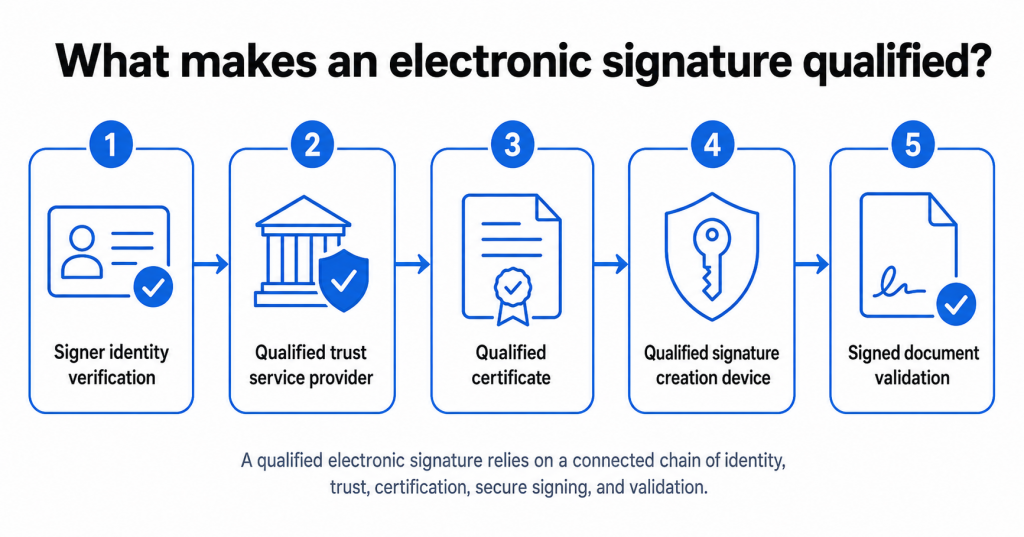
A signature becomes qualified only when the full trust chain is in place. It is not enough for a provider to call a signature “secure” or “compliant.” The signature must meet the legal and technical requirements for QES.
A qualified electronic signature depends on:
- A qualified trust service provider that is authorized to provide qualified trust services.
- A qualified certificate that confirms the signer’s identity.
- A qualified signature creation device that protects the signature creation data.
- A signing process that links the signature to the signed document and helps detect later changes.
- A validation process that confirms the certificate, provider status, and document integrity.
This is where public key infrastructure, digital certificates, private keys, and signature validation come together. In plain English, the system must prove who signed, protect how they signed, and show whether the document changed after signing.t signature, the sender needs to access the invite settings and select Qualified Electronic Signature as the signature type for the document.
Why QES has the same legal effect as a handwritten signature
One of the most important eIDAS rules is that an electronic signature cannot be denied legal effect only because it is electronic. This supports the legal recognition of electronic signatures in the EU.
However, QES has an additional legal benefit. A qualified electronic signature has the same legal effect as a handwritten signature across EU Member States.
This distinction matters. A simple electronic signature or advanced electronic signature can still be valid and useful, but it does not automatically receive the same legal equivalence as a handwritten signature under eIDAS. A QES does.
For legal, compliance, and procurement teams, this can make QES useful when a document needs a stronger evidentiary record, higher assurance of the signer’s identity, or cross-border recognition in the European Union.
For a more detailed comparison of electronic and handwritten signatures, see our blog: Electronic signature vs. wet signature.
Still, local law can matter. eIDAS does not remove every national rule about which documents can be signed electronically or what extra formalities may apply. Some real estate, inheritance, employment, or regulated transactions may still require special handling. For high-risk legal documents, teams should confirm local requirements before relying on any signing method.
How identity verification works before a QES is issued
Identity verification is central to QES. Before a qualified certificate is issued, the signer’s identity must be verified by a qualified trust service provider or through an accepted identity verification method.
This process helps confirm that the signer is the real person connected to the certificate. Depending on the trust service provider and the signer’s jurisdiction, verification may involve electronic identification, document checks, database checks, two-factor authentication, video verification, or another approved method.
Once identity verification is complete, the qualified certificate can be issued. The certificate connects the signer’s identity to the electronic signature and supports validation of the signed document.
For users, this may feel like an extra step. For businesses, it is the step that gives QES its stronger assurance. It helps prove that only the signatory could complete the signing process under the provider’s required controls.
How to verify a qualified trust service provider
A qualified trust service provider is not simply a vendor with strong security features. In the EU, qualified status is tied to official trusted lists.
Each EU Member State maintains a trusted list of qualified trust service providers and qualified trust services. The European Commission also provides access to EU trusted lists so users can check whether a provider and service have qualified status.
This matters because a provider may offer several trust services, and not all of them may be qualified. When QES is required, teams should confirm that the relevant provider and service appear with valid qualified status.
Mandatory checks for a strong verification workflow:
- The trust service provider.
- The specific qualified trust service.
- The qualified certificate.
- The status of the certificate at the time of signing.
- The integrity of the signed document.
- The result of signature validation.
This helps confirm whether the signature is actually qualified and whether the signed file can be trusted.
Qualified electronic signature vs. qualified electronic seal
A qualified electronic signature and a qualified electronic seal are related, but they are not the same.
A qualified electronic signature is created by a natural person. It shows that a person signed a document.
A qualified electronic seal is created by a legal person, such as a company or public organization. It helps prove the origin and integrity of an electronic document.
For example, a company may use a qualified electronic seal to show that a document came from that organization and has not been changed. A person may use a qualified electronic signature to sign a contract, form, or approval.
The difference is simple: signatures are for people, while seals are for organizations.
When to use QES for high-assurance document workflows
QES is useful when the cost of signer uncertainty is high. It is often used for workflows where identity, legal assurance, and document integrity are more important than speed alone.
Common QES use cases
- Cross-border EU transactions where handwritten-signature equivalence matters.
- High-value contracts that need stronger signer attribution.
- Regulated onboarding workflows.
- Public-sector or government forms that require higher assurance.
- Legal documents where the signer’s identity may need to be defended later.
- Financial, HR, or procurement workflows with strict internal controls.
QES may be more than you need for routine approvals, low-risk internal forms, or simple acknowledgments. In those cases, a simple electronic signature or advanced electronic signature may be enough.
The practical rule is this: use QES when you need the strongest eIDAS-recognized electronic signature, verified signer identity, and the same legal value as a handwritten signature.
How to add QES with SignNow
SignNow supports qualified electronic signature workflows for teams that need stronger signer identity verification, qualified certificates, and high-assurance document signing under the eIDAS framework. In SignNow, a QES workflow combines identity verification with a qualified certificate issued by a qualified trust service provider, helping teams collect signatures with a stronger evidentiary record for regulated or high-value transactions.
Availability may depend on the signer’s jurisdiction, the selected trust service provider, and the account’s QES settings. Before sending a document for qualified electronic signature, teams should confirm that QES is enabled in their SignNow account and that the required trust service providers are available for the signer’s location.
Your step-by-step instructions to adding QES
- Activate QES settings in the SignNow account
An account administrator must contact the sales team to activate the QES settings and then enable the QES mode in their account settings.
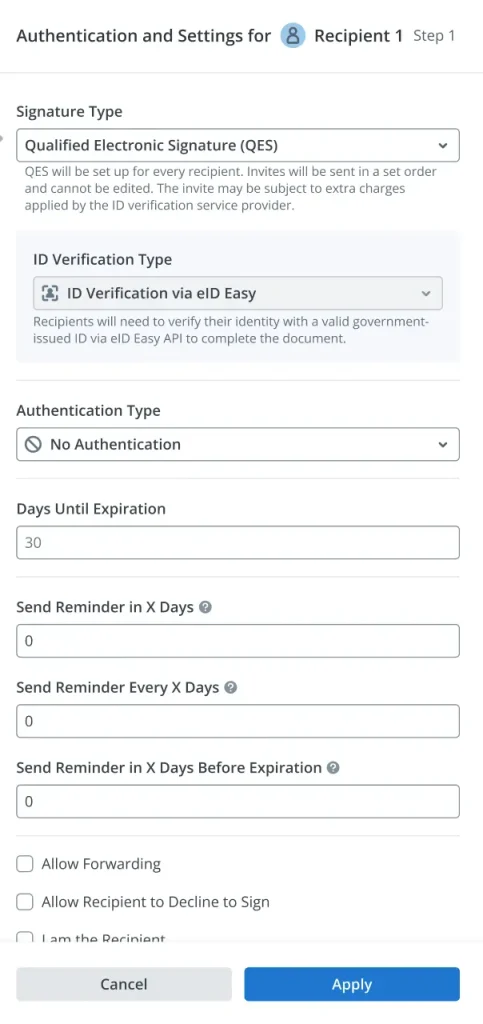
2. Select QES as the signature type
While preparing to send an invitation for document signature, the sender needs to access the invite settings and select Qualified Electronic Signature as the signature type for the document.
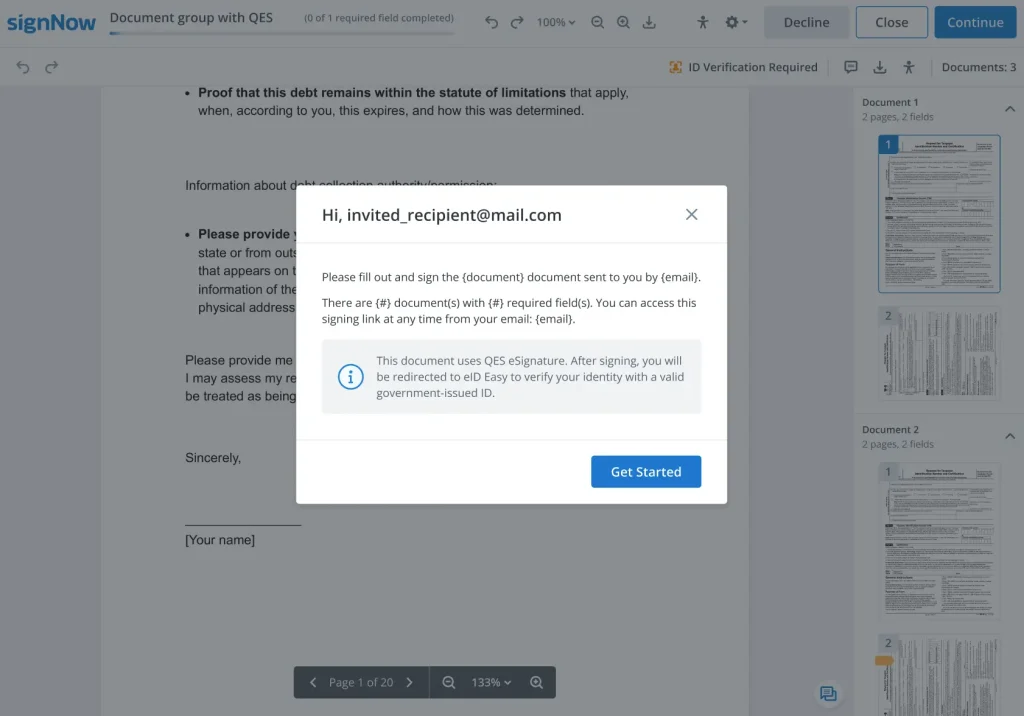
3. As a signer, follow the prompts to verify your identity
The signer receives an invitation to sign the document and is prompted to verify their identity before proceeding.
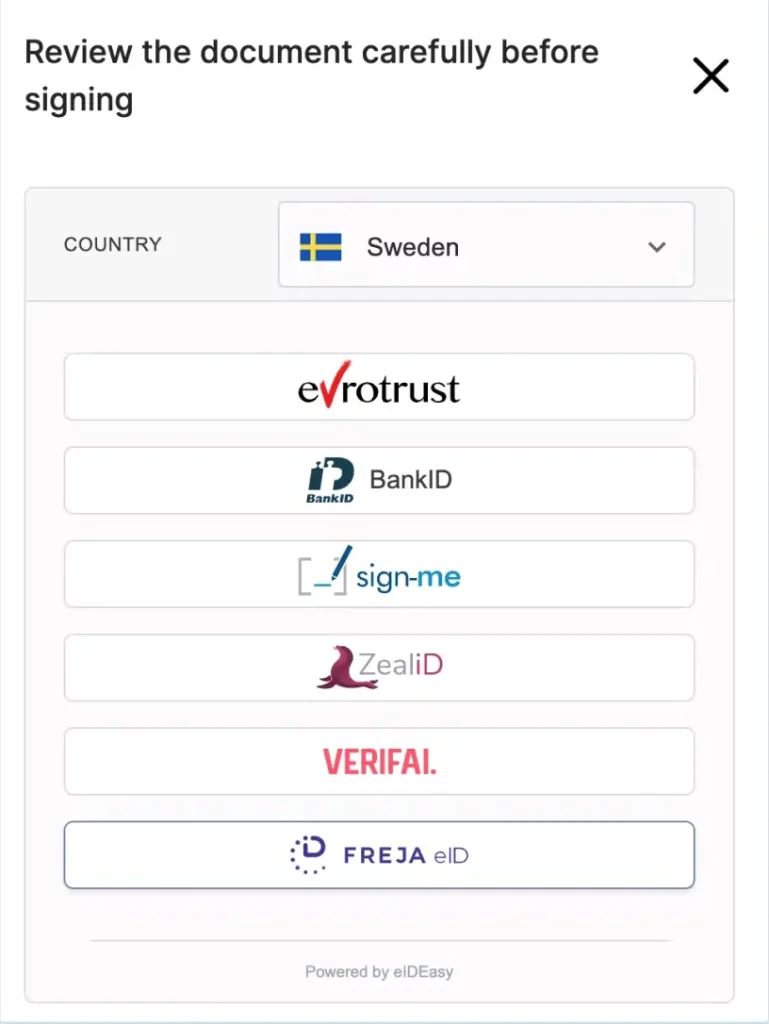
4. Select a trust service provider
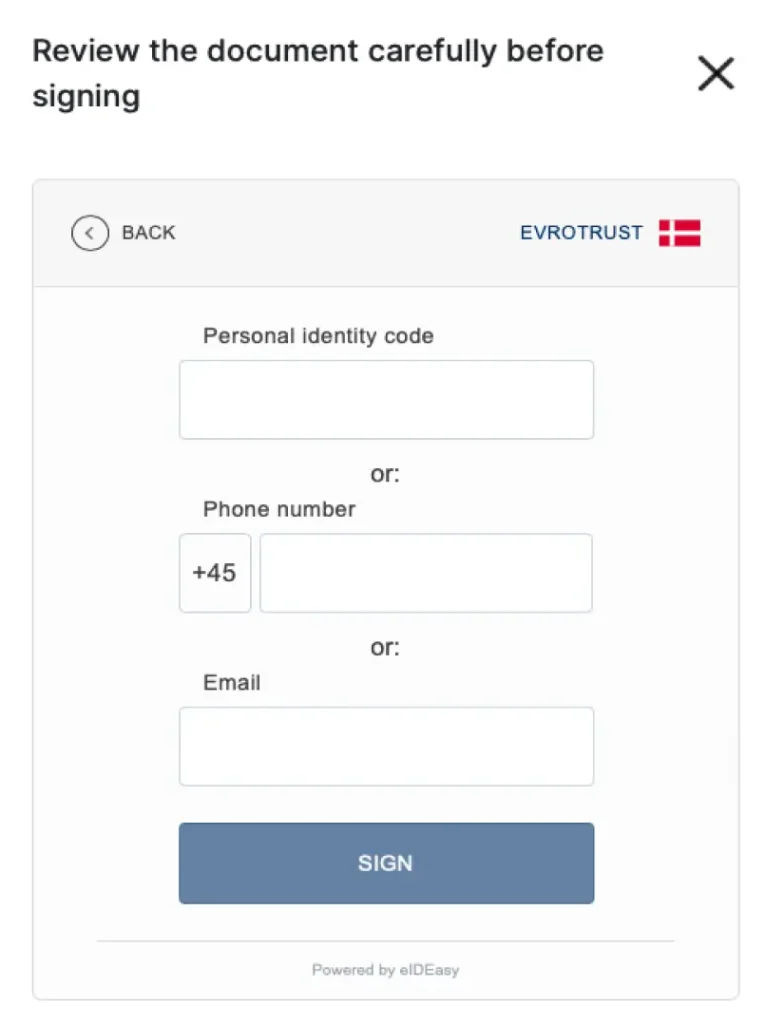
For example, when Sweden is selected, the available methods shown in the SignNow workflow may include Evrotrust, BankID, D-Trust sign-me, ZealiD, Verifai, and Freja eID. Some providers, such as Evrotrust, D-Trust, and ZealiD, are directly connected to qualified trust services listed on an EU or EEA Trusted List. Others, including BankID, Verifai, and Freja eID, may act as identity verification or authentication methods within a QES workflow, while the qualified certificate is issued by a separate Qualified Trust Service Provider.
5. The signer completes the identity verification.
The signer then completes the required identity verification step. Depending on the trust service provider, this may include two-factor authentication, database verification, or another approved identity verification method.
- Complete the signing process
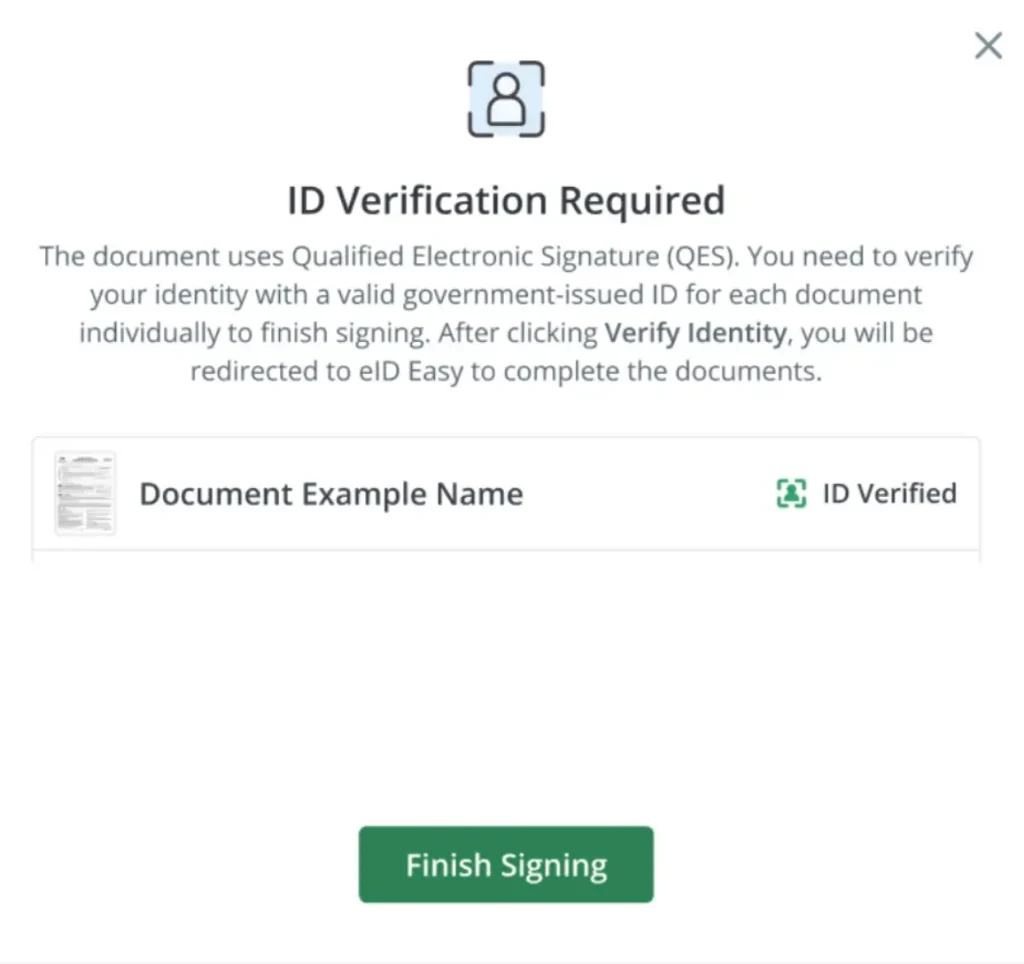
After the signer passes identity verification, they complete the signing process in SignNow. Once the signer’s identity has been verified and the document has been signed, the qualified electronic signature is applied to the document.
How QES identity verification works in SignNow
airSlate SignNow works with trust service providers that are responsible for identifying signatories and issuing the qualified certificate used in the QES process.
The signer needs to create a signature certificate with the chosen trust service provider and complete identity verification. In most cases, the signature certificate is generated during the signing process. In some cases, if required by the provider, the signer may need to create a signature certificate with the trust service provider before attempting to sign the document.
The certificate generated by the trust service provider helps confirm the signer’s identity and links the signatory to the signed document. This supports document integrity, signer attribution, and a more complete audit trail for the signing process.
For businesses, this means SignNow can support QES workflows without requiring teams to manage the full trust service provider process manually. The sender prepares and sends the document in SignNow, while the signer completes the required identity verification through the available provider before applying the qualified electronic signature.
Watch the video below for more information and insights:
When to use SignNow for QES workflows
SignNow QES workflows can be useful when a team needs more assurance than a simple electronic signature can provide. Common examples include cross-border EU agreements, regulated HR documents, financial service workflows, procurement agreements, and other legal documents where signer identity, qualified certificate validation, and document integrity are especially important.
For lower-risk approvals or routine internal forms, a simple electronic signature or advanced electronic signature may be enough. QES is best reserved for workflows where the document, jurisdiction, or internal compliance requirements call for the strongest eIDAS-recognized electronic signature.
Final thoughts
A qualified electronic signature is not just a more formal version of an electronic signature. It is a high-assurance signing method built for stronger identity verification, document integrity, and legal recognition under eIDAS.
For routine approvals, a simple electronic signature may be enough. For higher-risk legal documents, cross-border EU transactions, or regulated workflows, QES can provide stronger assurance and the same legal value as a handwritten signature.
If your team needs a secure way to send documents for a qualified electronic signature, try SignNow and explore how QES workflows can support high-assurance signing from invitation to completed document.
Glossary of QES terms
Qualified electronic signature (QES): The highest-assurance electronic signature under eIDAS, with the same legal effect as a handwritten signature in the EU.
Electronic signature: Data in electronic form used by a signatory to sign other electronic data.
Advanced electronic signature: An electronic signature that is uniquely linked to the signer, identifies the signer, remains under the signer’s control, and helps detect later changes.
Qualified certificate: A certificate issued by a qualified trust service provider that links a signer’s identity to signature validation data.
Qualified trust service provider: A provider listed with qualified status in an official EU trusted list for specific qualified trust services.
Qualified signature creation device: A secure device or service used to create a qualified electronic signature and protect signature creation data.
Signature creation data: Unique data used by the signer to create an electronic signature.
Identity verification: The process used to confirm the signer’s identity before a qualified certificate is issued.
Digital certificate: An electronic certificate that connects identity information with cryptographic validation data.
Document integrity: The ability to detect whether a signed document was changed after signing.
FAQ
Can a company sign with a QES?
A QES is created by a natural person, not by a company. If an organization needs to prove that a document came from the company and has not changed, a qualified electronic seal may be more relevant.
Is QES required for every contract in the EU?
No. Many contracts can be signed with a simple electronic signature or an advanced electronic signature. QES is usually considered when the workflow needs stronger legal assurance, identity verification, or handwritten-signature equivalence.
Does QES work for remote signing?
Yes, QES can support remote signing when the process uses approved identity verification, a qualified certificate, and a qualified signature creation device. In many modern workflows, the signer can complete identity verification online through an available trust service provider.
What should I check before choosing QES?
Check the document type, jurisdiction, risk level, signer location, and whether local law requires a specific formality. You should also confirm that the relevant provider and trust service have qualified status.
Is a scanned handwritten signature the same as QES?
No, it works otherwise. A scanned handwritten signature is usually just an image of a signature. A QES is a regulated electronic signature supported by identity verification, a qualified certificate, and qualified signature creation technology.
Sources:
- What is a qualified electronic signature?
- Electronic signature vs advanced electronic signature vs qualified electronic signature
- Qualified electronic signature: criteria
- Why QES has the same legal effect as a handwritten signature
- How identity verification works before a QES is issued
- How to verify a qualified trust service provider
- Qualified electronic signature vs. qualified electronic seal
- When to use QES for high-assurance document workflows
- How to add QES with SignNow
- When to use SignNow for QES workflows
- Final thoughts
- Glossary of QES terms
- FAQ
- Sources:
